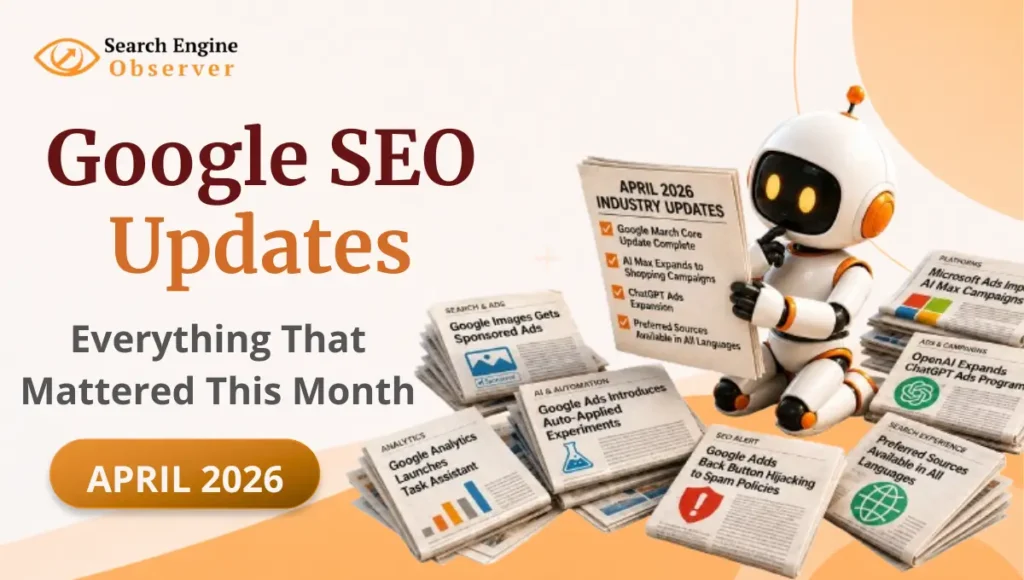
April 2026 was one of those months where you blink and miss something important. From a completed Core Update to new spam rules, a major ad format being phased out, and AI expanding into places it hasn’t been before – the April 2026 SEO updates covered a lot of ground. Microsoft and Open AI made moves too.
None of these changes announced themselves loudly. But if you pay attention to them – and adapt – you’ll stay ahead of the ones who don’t.
I’ve gone through every update so you don’t have to. Here’s what actually changed – and what it means for your website.
Google Search & Core Updates
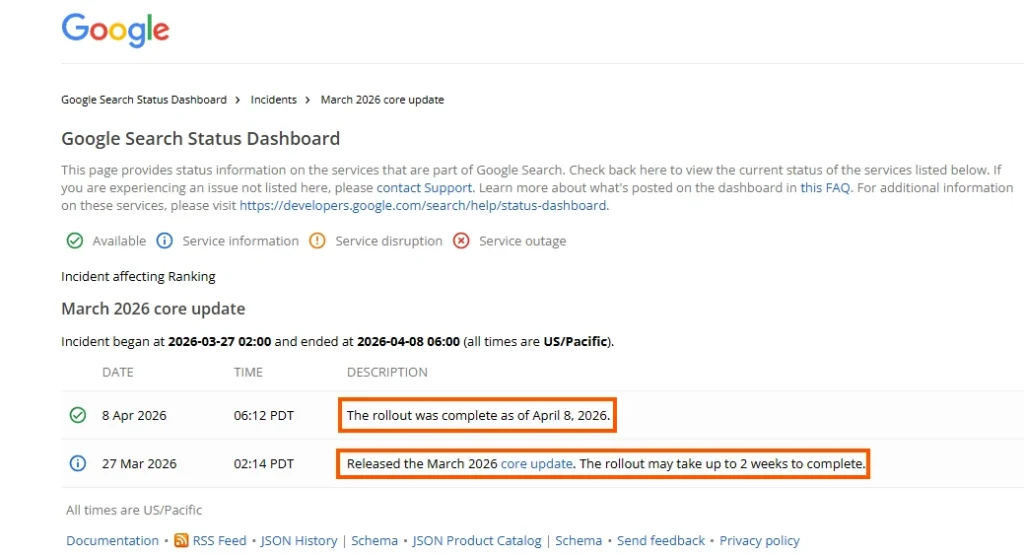
Google Officially Completed the March 2026 Core Update Rollout
If your website traffic felt unstable over the past few weeks, the March 2026 Core Update could be the reason.
Google first launched the update on March 27, and on April 8, the company officially confirmed that the rollout was complete making it one of the faster core updates in recent months.
So what exactly changed?
Core updates are broad changes to how Google evaluates and ranks content across Search. They don’t target specific websites or niches. But pages with thin, repetitive, or low-value content – the kind that just repeats what everyone else is already saying – often see the biggest drops.
On the other hand, websites publishing original, well-researched, and genuinely helpful content typically hold their ground. Some even gain rankings after a core update.
Did this update affect you?
The easiest way to check is to open Google Search Console and look at your traffic data from March 27 onwards. If you see a clear drop starting around that date – the Core Update may be one possible reason.
If your rankings dropped, avoid making rushed changes immediately. Core updates take time to fully settle, and panic-editing your content rarely helps. Instead, look at which specific pages lost rankings, ask yourself honestly – is this content genuinely useful? Does it say something original? – and then focus on improving those pages first.
Google’s message with every core update is the same: write for people, not for algorithms. That’s still the approach Google consistently recommends.
Google Adds “Back Button Hijacking” to Its Spam Policies
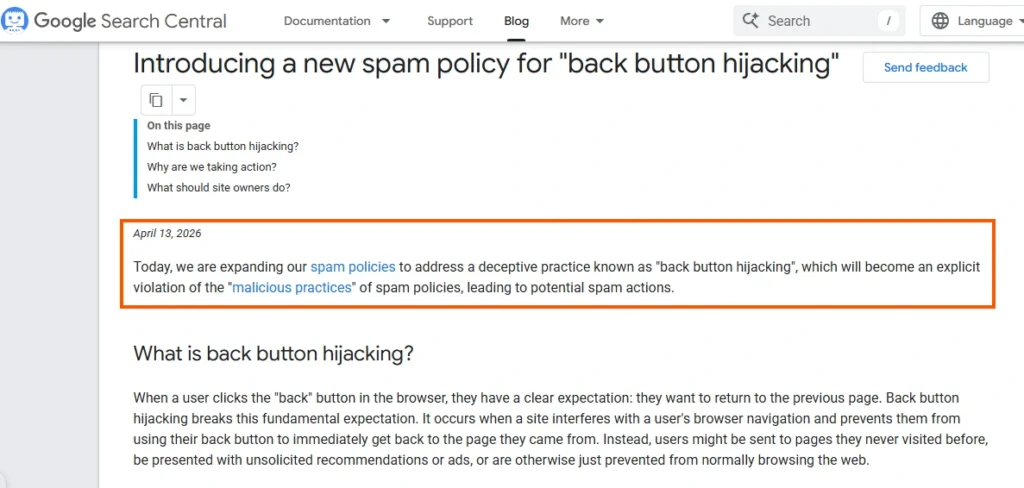
On April 13, 2026, Google introduced “Back Button Hijacking” as a new category in its spam policies – and if you’ve never heard this term before, let’s break it down simply.
You know how when you visit a website and hit the back button, you expect to go back to the previous page? Back Button Hijacking is when a website manipulates that behaviour. Instead of taking you back to where you came from, it either redirects you to a completely different page or keeps you stuck on the same site – basically trapping you.
It’s a bad experience for users, and Google now considers it a spam practice. If your website is doing this – even without realizing it – it’s a good idea to fix it as soon as possible.
Pro Tip
Check your website’s redirect settings and any scripts that might be interfering with browser navigation. If a user wants to leave your page, let them. Trying to trap visitors never works in your favour – and now it can actively hurt your rankings too.
Google AI Mode on Desktop Now Opens Website Links in a Side Panel
On April 16, 2026, Google introduced a new side-by-side browsing experience in AI Mode on Chrome desktop. Website links now open right next to your AI conversation, so you can read content and keep chatting without switching tabs.
So here’s what that means in practice. Earlier, if you were using AI Mode and clicked on a website link, it would open in a new tab – and you’d lose your place in the conversation. Now, the link opens right beside your AI Mode chat in a side panel. You can read the content and come back to your conversation without any disruption.
Robin Stein, Vice President of Product for Google Search, shared the announcement while introducing this new AI Mode browsing experience:
Today we shipped a new Search experience in @googlechrome to help you explore the web without constant back and forth between tabs. Now, when you click a link from AI Mode, the website opens side-by-side.
— Robby Stein (@rmstein) April 16, 2026
It's a game changer for comparing details and products across sites,… pic.twitter.com/Ho6bzRgF3v
It’s one of those updates that sounds minor but actually makes the experience a lot smoother – especially if you’re doing research and jumping between multiple sources.
Just to clarify – this is a desktop-only change. On mobile, the experience remains the same as before.
Google Released Updated Best Practices for “Read More” Deep Links
On April 20, 2026, Google published updated guidance for “Read More” deep links, offering publishers a clearer understanding of how to structure content so Google can identify and link to specific sections within a page. These deep links can help users jump directly to the information they need from search results, improving both navigation and user experience.
You’ve probably seen this in action without realising it. When you search for something on Google – say, “iPhone 15 review” – sometimes below the main result you see small clickable links like “Jump to: Camera · Battery · Price.” Instead of scrolling through the whole article, you click directly on the section you need. That’s a deep link.
Google wants to show these links in search results because they’re genuinely helpful for users. But it can only do that when your content is properly structured – clear headings, well organised sections. If your article is just one big block of text, Google has nothing to link to.
The new guidelines tell website owners exactly how to set this up correctly.
Pro Tip
If you have a long article – say, a complete guide on Instagram marketing – make sure each section has a clear, descriptive heading. Instead of simply writing “Tips,” use something more specific like “Tips to Grow Your Instagram Following in 2026.” Clear section headings help both users and search engines understand your content structure, which may improve the chances of Google showing deep links to key sections in search results.
Google’s Preferred Sources Feature Now Works in All Supported Languages
On April 30, 2026, Google rolled out its Preferred Sources feature to all supported languages – and this one’s interesting for both readers and content creators.
So what exactly is Preferred Sources? You know how you have certain websites you always go back to for news or information? Maybe there are a few blogs or news sites you really trust. Preferred Sources lets you tell Google exactly that – “hey, I like these websites, show me their content first.” And Google will prioritise those sources in your search results.
Until now, this feature only worked in English. So if you consumed content in Hindi, Spanish, French, or any other language – you simply couldn’t use it. That changes with this update.
And the numbers show it’s already working. According to Google’s official announcement:
“Readers are twice as likely to click through to a site after marking it as a Preferred Source. So far, people have already selected over 200,000 unique sites – from niche local blogs to global news desks.”
WHAT IT MEANS FOR YOU
If you’re a reader – you’re now in control. You no longer have to scroll past websites you don’t trust just to find the ones you actually like.
If you’re a content creator – this is even bigger. When someone adds you as a preferred source, Google keeps showing them your content every time they search for something relevant. You don’t have to fight the algorithm every single time. And now that this works in all languages – it’s not just English websites that benefit anymore.
And there’s something else worth knowing. According to Google’s official documentation:
“Preferred sources can also appear in AI Mode and AI Overviews in all languages and locales where those features are available.”
How to Get Added as a Preferred Source – As a Content Creator
You can’t force people to add you. But you can make it easy for them to want to.
- Publish consistently – websites that post regularly are more likely to be trusted and remembered
- Be genuinely useful – not just another website repeating what everyone else says
- Ask your audience directly – most people don’t even know this feature exists. At the end of your articles, tell your readers they can add you as a preferred source on Google. It takes them 30 seconds
Google Ads Updates
Google Ads Can Now Automatically Apply Winning Ad Tests
Google is making ad testing more automated.
If you run Google Ads, you’ve probably tested different versions of your campaigns before – maybe different headlines, bidding strategies, audiences, or even two versions of the same ad campaign. This process is called a Google Ads experiment.
Earlier, once the test ended, advertisers had to manually review the results and decide which version performed better. But according to a new update introduced on April 1, 2026, Google Ads can now automatically apply the better-performing experiment results for you.
So if one campaign variation clearly performs better, Google may automatically switch your campaign to that setup instead of waiting for manual approval.
Think of it like testing two different YouTube thumbnails. Earlier, you had to check the analytics yourself and manually select the thumbnail getting more clicks. Now Google is trying to handle that decision automatically inside ad campaigns.
This update is part of Google’s bigger push toward automation and AI-driven campaign management. The idea is simple – reduce manual work and help advertisers make faster optimizations.
Honestly, this could save a lot of time, especially for agencies or marketers managing multiple accounts. But it’s still important to review experiment results carefully because short-term performance doesn’t always translate into better long-term business results.
Google Is Now Showing Sponsored Ads Inside the Images Tab on Smartphones
You know how you sometimes open Google Images to look for outfit ideas, home decor inspiration, or just to see what a product looks like? Well, something has changed.
From April 7, 2026, Google has started showing paid ads right inside the Images tab on your phone. So now, when you’re scrolling through image results, some of those images are actually ads – not just regular search results.
WHAT IT MEANS FOR YOU
If you sell a product that people search for visually – clothes, food, furniture, skincare, anything like that – this is actually good news. You can now show your product images to people who are already in “browsing mode” – before they’ve even decided what to buy. That’s a really valuable moment to show up.
If you’re running Google Ads, check your dashboard for a new placement option in the Images tab. And make sure your product images are high quality – blurry or dull images simply won’t work here. People are scrolling fast. You need to stop them.
Not running ads? This still matters for you. More ads in Images means organic image results get pushed down. So double check that your images have proper file names and alt text – that’s how Google understands what your image is about.
Google Ads Now Lets Advertisers Copy and Paste AI Prompts More Easily
On April 7, 2026, Google made it easier to copy and paste AI text prompts directly inside Google Ads – and if you’re not sure what that means, here’s a simple way to think about it.
When you ask Google’s AI to help write ad copy, you give it instructions – something like “write a catchy headline for a skincare brand” or “generate a product description for sneakers.” Those instructions are called prompts. Earlier, reusing or managing them inside the platform wasn’t very smooth. Now it is.
But what was the actual problem before?
Copy-pasting from Google Docs or Notion into Google Ads was always possible – that was never the real issue. The actual problem was that Google Ads had no way to save or manage your prompts inside the platform itself. So every time you wanted to reuse a prompt that worked well, you had to switch out of Google Ads, find your saved prompt somewhere else, copy it, come back, and start over. For one campaign that’s fine. But if you’re running multiple campaigns at a time – each needing different prompts for different audiences and goals – this back-and-forth adds up fast.
And now?
Your prompts live inside the platform itself. No more switching tabs, no more hunting through docs, no more retyping the same instruction again and again. Whatever prompt worked well for you – save it, reuse it across campaigns, and keep your workflow moving without any interruption. For advertisers managing multiple campaigns at once, this is genuinely useful. Same prompt, different campaigns, zero extra effort.
It sounds like a minor update – but it reflects something bigger. More and more advertisers are using AI to create ad copy and headlines instead of writing everything from scratch. Google is just making that workflow a little easier.
Google Is Testing a Swipeable Location Carousel for Search Ads
Imagine searching “gym near me” on Google and instead of seeing one location, you can swipe through all nearby branches of the same business – ratings, distance, everything – right there on the results page. No clicking, no extra steps.
Google was spotted testing this around April 2026. One ad, all your locations, in a horizontal carousel.
Why this matters
If you run a business with multiple locations – restaurants, gyms, clinics, salons – this is huge. One single ad covers all your branches. No more running separate ads for each one.
But here’s the thing: when users are swiping through locations side by side, every branch is being compared in real time. One branch with bad reviews or incomplete info? It drags the whole ad down. Your brand name alone won’t save it.
How to prepare right now
The feature is still in testing, but you can get ahead of it today:
- Clean up your Google Business Profile for every location – name, address, phone, timings, all accurate
- Get more reviews – in a carousel, the branch with better ratings wins the click
- Add quality photos to every branch – first impressions hit harder in a swipeable format
- Set up Location Assets in Google Ads – this feature is built on top of them, so if you haven’t done this yet, start here
Small effort now, big advantage when it officially rolls out.
Google Is Making Enhanced Conversions Way Simpler
What even is a conversion? When someone sees your ad and then buys something, fills a form, or calls you – that’s a conversion. But Google often misses tracking these because people switch devices, use incognito mode, or block cookies.
Enhanced Conversions fixes this. When someone fills a form on your website and enters their email or phone number, that info is securely shared with Google. Google then checks – did this same person see my ad? If yes, the conversion gets counted. Simple as that.
What’s changing?
Earlier, this feature was split into two separate things and setting it up was genuinely confusing. Google announced on April 10, 2026 that everything is being merged into one single on/off toggle.
It’s happening in two steps:
- April 2026 (already live) – Google now accepts data from all sources at the same time. Nothing you need to do.
- June 2026 (coming soon) – One single toggle goes live. Both features fully become one.
Already using it? Do nothing – you’ll be automatically moved to the new system.
Never set it up? Go to Goals → Settings → Customer data use in Google Ads and switch it on. Accept the Data Processing Terms – don’t skip that part.
Pro Tip
Before you turn it on — make sure your basic conversion tracking is already working. This is an upgrade, not a fix. Broken foundation? Sort that first, then enable this.
Google Is Planning to Retire Dynamic Search Ads – Here’s What’s Replacing Them
On April 15, 2026, Google announced that it plans to retire Dynamic Search Ads — and if you’re currently running them, it’s time to pay attention.
Dynamic Search Ads made things simple – you’d connect your website to Google, and it would automatically create ads based on your content. Someone searches “red sneakers,” Google finds that page on your site and shows them an ad. No manual work needed. It was a great tool – and it served advertisers well for over 15 years.
But Google now has something smarter – AI Max. It does everything Dynamic Search Ads did, but instead of just reading your website, it also looks at real-time user behaviour and search patterns to decide who to show your ad to and when.
Think of Dynamic Search Ads as a basic robot that only read your website. AI Max is the smarter upgrade.
And here’s the part that actually matters – this isn’t just a heads up. Google has confirmed that all eligible Dynamic Search Ads campaigns will be automatically migrated to AI Max starting September 2026. There is no opt-out. If you do nothing, Google will make the switch for you.
What It Means for You
This affects you if you’re running Dynamic Search Ads, Automatically Created Assets, or campaign-level broad match settings – all three will be automatically upgraded to AI Max in September.
Migrating early means you stay in control of your settings. Waiting means Google decides the configuration for you.
Google Ads API Will Soon Require Multi-Factor Authentication
On April 17, 2026, Google announced that Multi-Factor Authentication is now mandatory for the Google Ads API – and the rollout already began on April 21.
You already use Multi-Factor Authentication in your daily life. When you log into Gmail or Instagram and it sends an OTP to your phone to verify it’s really you – that’s Multi-Factor Authentication. It’s just an extra security step on top of your password.
Now, most people manage their Google Ads campaigns manually through the Google Ads dashboard. But bigger businesses and agencies often use special software tools that connect directly to Google Ads and manage campaigns automatically – without logging in manually every time. The Google Ads API is what makes that connection possible. Think of it as a back door that lets external tools access your Google Ads account.
What’s changing is that this back door is getting a stronger lock. Until now, these tools only needed a password to connect. Google is now making it mandatory to have that extra OTP verification step as well.
Existing tokens will continue to work without interruption. Only new authentications will require MFA by default. So if everything is already set up and running, you won’t see any immediate disruption.
If you manage your own campaigns through the Google Ads dashboard, this doesn’t affect you at all. But if an agency or a third party tool manages your ads, check with them to make sure they’ve already enabled 2-step verification on their Google account – otherwise they may run into access issues when they next authenticate.
Section 3Google Tools & Platforms
Google Brings Back the Data Studio Name
If you’ve ever created a marketing report or shared a dashboard with a client, chances are you’ve come across Looker Studio. It’s Google’s free reporting tool that helps you turn raw data from sources like Google Analytics, Google Ads, Search Console, and Google Sheets into visual dashboards that are much easier to understand.
Think of it this way: instead of looking at hundreds of rows of numbers, you can see your traffic, conversions, ad performance, and other key metrics neatly organized into charts and graphs.
Now, Google has announced a major change.
On April 11, 2026, Google revealed that Looker Studio is being renamed back to Data Studio – a name many marketers may remember from before 2022.
If you’re wondering why Google is changing the name again, here’s the quick backstory. The tool originally launched as Google Data Studio in 2016. Then, after Google acquired the business intelligence platform Looker, it renamed the product to Looker Studio in 2022.
The problem? A lot of people ended up confusing Looker Studio with Looker itself.
Even though the names sounded similar, they were built for very different users. Looker Studio was the free dashboard and reporting tool most marketers used every day, while Looker was a much more advanced enterprise analytics platform designed for larger organizations.
So now Google is bringing back the Data Studio name to make that distinction clearer.
But this isn’t just a simple rebrand.
Google says Data Studio is becoming a central place for interacting with different Google Data Cloud assets. Alongside traditional reports and dashboards, users will also be able to access things like BigQuery conversational agents and data apps built in Colab notebooks from the same environment.
Google is also introducing two versions of the product:
- Data Studio – the free version for creating and sharing reports and dashboards.
- Data Studio Pro – a more advanced version aimed at teams and organizations that need additional AI features, security controls, and deeper Google Cloud integration.
The good news is that if you’re already using Looker Studio, you don’t need to worry about migrating anything. Google says your existing reports, data sources, and user access will automatically move to the new Data Studio experience.
So, for most marketers, nothing really changes in terms of day-to-day usage. The biggest difference is that the familiar Data Studio name is back, and Google is positioning it as a broader hub for data and analytics assets moving forward.
Google Analytics Now Has a Task Assistant to Help You Get Started
If you’ve ever opened Google Analytics and felt completely lost about where to start, this update is for you.
Google Analytics is a powerful tool, but let’s be honest – setting it up correctly hasn’t always been easy. There are lots of settings, configurations, and features to deal with, and many users either miss important setup steps or aren’t sure what to do next.
That’s where the new Task Assistant comes in.
Think of it as a built-in guide inside Google Analytics. Instead of figuring everything out on your own, it gives you a list of recommended tasks and walks you through them step by step.
Some of the tasks include:
- Connect your accounts
- Enhance your reporting
- Optimize your advertising
- Add first-party data
- Fix data issues
What makes this feature useful is that it doesn’t just tell you what to do. It also explains why a particular task matters and helps you complete it. So rather than jumping between settings and documentation, you can get setup guidance directly inside Google Analytics.
For beginners especially, this should make Google Analytics feel much less overwhelming. And if you haven’t set up GA4 yet – or want to understand it better – check out our complete beginner’s guide to GA4.
Section 4Microsoft & OpenAI
Microsoft Ads Now Makes It Easy to Import Google’s Performance Max Campaigns
On April 16, 2026, Microsoft Ads announced that advertisers can now easily import their Google Performance Max campaigns directly into Microsoft Ads – and if you’re not familiar with Microsoft Ads, let’s quickly cover that first.
Just like Google Ads shows your ads on Google Search, Microsoft Ads shows your ads on Bing – Microsoft’s search engine. A lot of people use Bing without even realising it, especially on Windows computers and laptops where Microsoft Edge is the default browser. So it’s actually a decent sized audience that many advertisers don’t want to miss out on.
Now, many advertisers run campaigns on both Google and Microsoft Ads to reach more people. But moving campaigns from one platform to the other used to be a pain – you’d have to manually rebuild everything from scratch. Same budget, same targeting, same ads – all over again. A lot of unnecessary work.
With this update, that’s no longer the case. As Microsoft officially announced:
“Now, we’re making it easier to launch Performance Max campaigns with New Customer Acquisition goals by adding the ability to import these campaigns from Google Ads into Microsoft Advertising.” – Microsoft Ads Official Blog, April 2026
In simple words – if you’re already running Performance Max campaigns on Google that are designed to reach first-time buyers, you can now bring those exact campaigns into Microsoft Ads in just a few clicks. No rebuilding from scratch.
And the results from early users speak for themselves:
“In their first weeks, they generated nearly 600% ROAS with new customers.” – Microsoft Ads, referring to ADAC Car Insurance results, April 2026.”
Think of it like copy-pasting your entire campaign from one platform to another – automatically. And don’t worry – your existing Microsoft Ads settings won’t be overwritten. The imported campaign only comes over if it doesn’t already exist in your account.
Less time on setup, more time on actually growing your business.
OpenAI Is Bringing Ads to More Countries
On April 16, 2026, ChatGPT ads began rolling out in Australia, New Zealand, and Canada – and this is bigger than it sounds.
If you haven’t heard – OpenAI, the company behind ChatGPT, started testing ads inside ChatGPT back in February 2026 in the US. And now they’re expanding internationally. As OpenAI officially stated:
“We’re beginning to roll out ads for users on Free and Go plans in Australia, New Zealand and Canada.” – OpenAI Official ChatGPT Release Notes, April 16, 2026
ChatGPT currently has 900 million weekly active users globally – that’s a massive, highly engaged audience. And brands can now show up right in the middle of their conversations.
But before you get too excited – here are a few things worth knowing:
Ads only appear for Free and Go tier users. Plus, Pro, Business, Enterprise, and Education subscribers see no ads at all. So it’s not everyone on ChatGPT – just the free users.
The ad format is simple – a clearly labelled “Sponsored” block appears at the bottom of a ChatGPT response, visually separated from the AI-generated answer. OpenAI insists ads never influence the actual responses.
What It Means for You
For advertisers – this opens up a completely new channel. It’s not Google, it’s not Meta – it’s something different. People using ChatGPT are actively looking for answers, recommendations, and solutions. Getting in front of that audience at that exact moment is powerful.
But here’s the honest reality – ChatGPT ads right now are a reach medium, not a performance medium. There’s no pixel, no conversion tracking, and targeting is basic – country level only. So if you’re expecting Google Ads-style performance tracking, you won’t get that just yet.
If you’re an advertiser – it’s worth keeping an eye on. Getting in early on a new platform often gives you an advantage before it gets crowded. And OpenAI has already confirmed they plan to expand to many more markets throughout 2026.
What These April 2026 SEO Updates Mean for Your Website
If April proved anything, it’s that search platforms are moving faster than ever.
Google is pushing deeper into AI and automation, Microsoft continues to follow a similar path, and OpenAI is steadily expanding its role in search and advertising. Some of these updates are worth keeping an eye on, while others may require action sooner rather than later.
The key is simple: stay informed, make small, consistent improvements, and don’t wait for Google to force changes on you. We’ll continue tracking the updates that matter most-so you know what changed, what it means, and what to do next.
I break down these updates every month – catch up on March 2026 and February 2026 if you missed them.
Which April update caught your attention the most-or are you already working on one? Let us know in the comments below.