
The most awaited Google I/O 2026 has finally wrapped up!
From smarter AI models to more capable agents, this year’s event was packed with updates that could change the way you interact with Google’s products every day.
Over two days, May 19–20, 2026, Google unveiled a wave of new models, AI agents, and tools aimed at helping you search smarter, create faster, shop easier, and get more done across its ecosystem.
With AI taking center stage throughout the event, Google showcased how it plans to make its technology more helpful, proactive, and capable than ever before.
So, what exactly did Google announce this year? Let’s dive into the biggest innovations introduced at Google I/O this year.
New Product Launches
Google I/O 2026 wasn’t just about updates-it was also about introducing completely new products. From AI agents that can take action for you to smarter tools for creating content and shopping online, these launches give you entirely new ways to get things done.
Gemini Omni Flash
If you’ve ever wished video creation felt as simple as having a conversation, Gemini Omni Flash is built for exactly that.
As the first model in the Omni family, it can combine images, audio, video, and text to generate high-quality, ultra-realistic content. Powered by Gemini’s real-world knowledge, Omni can transform these inputs into detailed videos while understanding the context behind your ideas.
You can edit videos simply by describing the changes you want in natural language. Whether it’s fine-tuning details or adding entirely new elements, Gemini Omni helps you turn even complex ideas into accurate, high-quality videos.
Gemini Omni doesn't just build scenes that look real, it reasons about what should happen next. It combines an intuitive understanding of physics with Gemini's knowledge of history, science, and cultural context.
— Sundar Pichai (@sundarpichai) May 19, 2026
Rolling out today starting with video outputs to Google AI Plus,… pic.twitter.com/EkLjv5O0dN
Gemini Omni takes things a step further than models like Veo, Nano Banana, and Genie, giving you a more seamless way to create highly realistic videos, images, and interactive simulations.
You can try Gemini Omni for free through platforms like YouTube Shorts and the YouTube Create app, while more advanced editing features are available with a paid plan.
Gemini Spark
The new Gemini Spark, your personal AI agent, that helps you navigate your digital life. Spark is a big change for Gemini. Now, instead of just answering your questions, it can actually do work for you and follow your instructions.
According to Google:
Spark represents a big shift for Gemini, transforming it from an assistant that can answer your questions into an active partner that does real work on your behalf and under your direction.
It runs on Gemini 3.5 and works directly inside Gmail, Docs, Slides, and other Google apps you already use.
The impressive part? It keeps working even when your phone is locked or your laptop is closed as it is a cloud-based agent.
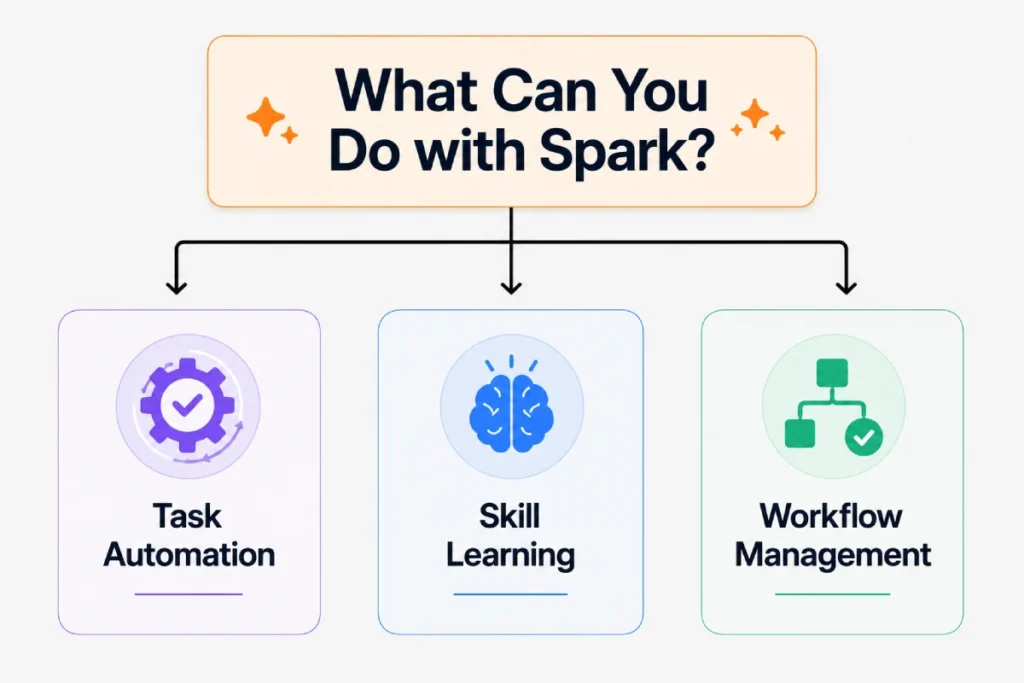
With Spark, you can do a lot more than just ask questions:
- Automate recurring tasks – Set something to run on its own so it keeps doing it automatically without you having to ask every time. For example, it can scan your credit card statements every month to spot hidden subscriptions.
- Learn new skills – Teach it a specific task once, and it handles it regularly. For instance, it can monitor your child’s school emails and send you a daily summary.
- Handle complete workflows – Give it a multi-step job, and it manages everything from start to finish. After a meeting, it can compile your notes, turn them into a proper document, and even draft the follow-up email automatically.
Soon, Spark will connect with apps like Canva, OpenTable, and Instacart, with more integrations coming. You won’t need to worry about it acting on its own, Spark will always ask you first before doing anything significant, like sending emails or making purchases. Control will be fully in your hands
Gemini Spark has already started rolling out to trusted testers, with Beta access now beginning to reach U.S. Google AI Ultra subscribers.
Google pics
Creating images with AI can be exciting – until you get something that’s almost perfect and have to start over just to fix one small detail. Google Pics aims to solve that problem. Built on Google’s latest Nano Banana model,
Pics is a new AI image creation and editing tool that gives you much more control over the creative process. Whether you’re starting with a blank canvas or editing an existing image, it helps you build exactly what you imagine.
Google Pics gives you the flexibility to make precise edits, update or translate text, create directly within Slides and Drive, and work alongside others on the same image-all without disrupting your creative flow.
Google Pics is currently rolling out to a limited group of Trusted Testers. If you’re a Google AI Pro or Ultra subscriber, you’ll get access later this summer, while Google Workspace business customers can look forward to a preview release as well.
Whether you’re creating social media posts, event flyers, presentations, or digital artwork, Pics is designed to make the process feel less like trial and error and more like bringing your ideas to life.
Universal Cart
What if your shopping cart could help you save money, spot better deals, and even prevent you from buying the wrong product?
That’s the idea behind Universal Cart. Whether you’re browsing Search, chatting with Gemini, watching YouTube, or checking Gmail, you can now add products to one smart cart that keeps track of everything for you.
We’re introducing Universal Cart — a new hub for shopping on Google.
— Google (@Google) May 19, 2026
🛍️ It will work across merchants and across services.
🛒 You’ll be able to add things to your cart whether you're shopping on Search, the @GeminiApp, @YouTube or @Gmail.
🛠️ The moment you add a product to… pic.twitter.com/MP8FreG6p1
If you’re buying something more complex, like parts for a custom PC, it can even spot compatibility issues and suggest better alternatives.
Starting this summer, you’ll be able to use Universal Cart in Search and the Gemini app across the U.S. Google also plans to bring it to YouTube and Gmail shortly after, so you can manage your shopping journey more easily across different services.
Major Upgrades
Some Google products got much bigger upgrades than usual this year. These aren’t just faster or better versions of existing tools-they’ve gained new capabilities that completely change how you can use them. In many cases, they feel more like a new generation of the product than a simple update.
Gemini 3.5 Flash
Gemini 3.5 Flash is Google’s newest AI – but instead of just chatting, it can actually perform tasks for you, like a smart digital employee.
Gemini 3.5 Flash is more like a smart employee who you can assign work to and walk away. It is especially focused on agentic coding, long horizon tasks, and real world workflows. Google has been expanding Gemini’s personal data access since early 2026 – something we covered in detail in our March SEO update.
Gemini 3.5 Flash is as smart as the best AI models out there, but here’s what makes it stand out – it is four times faster than all of them. On an intelligence vs speed graph, every other model is either one or the other. Gemini 3.5 Flash is the only one in the top right corner, winning on both.
If you compare Gemini 3.5 Flash to Google’s previous model Gemini 3.1 Pro, it’s better across almost every benchmark. The biggest jump you’ll notice is in coding and in GDPval – a test that measures how well an AI can handle real-world tasks that have actual economic value, like tasks people get paid to do.
Meet Gemini 3.5 Flash — our strongest agentic and coding model yet.
— Google (@Google) May 19, 2026
It delivers frontier-level performance at 4x the speed of comparable frontier models — often at less than half the cost.
Generally available, starting today. 🧵#GoogleIO pic.twitter.com/jLhqozutwG
Gemini 3.5 Flash is available to you right now, regardless of your use case. If you’re a regular user, you can find it in the Gemini app and Google Search.
If you’re a developer, it’s ready for you in Google AI Studio, Android Studio, and the Gemini API. And if you’re on the enterprise side, you can access it through the Gemini Enterprise platform.
Gemini Antigravity 2.0
Google has given Antigravity a major upgrade with the launch of Antigravity 2.0. Unlike before, when Antigravity was mainly focused on coding, the new version is built for everyone.
Whether you need help with planning a project, writing content, researching a topic, or analyzing information, you can now use Antigravity without ever opening an IDE (Integrated Development Environment ).
The AI agent is now more capable than ever. It can now create smaller sub-agents to handle different parts of a task on their own. While those sub-agents take care of the details, the main agent stays focused on the bigger picture, helping you get more done in less time.
Google has also introduced Scheduled Tasks, so you no longer have to manually start the same task over and over again. You can simply tell Antigravity when you want a task to run, whether it’s once or on a recurring schedule, and it will take care of the rest.
Google is also giving you more control over how the agent works. With JSON-based configurations, you can customize its behavior and responses to better match your needs.
Voice interactions have been improved as well, with your words now appearing on screen in real time as you speak, making conversations feel much more natural.
If you already have the Antigravity IDE installed, the next update will automatically bring Antigravity 2.0 to you. At that point, you’ll get to choose whether you want to keep the old IDE as well, which is a good idea if you’re a developer.
You can tell the two apps apart on your dock by their icons – Antigravity 2.0 has a white background, while Antigravity IDE has a black grid background.
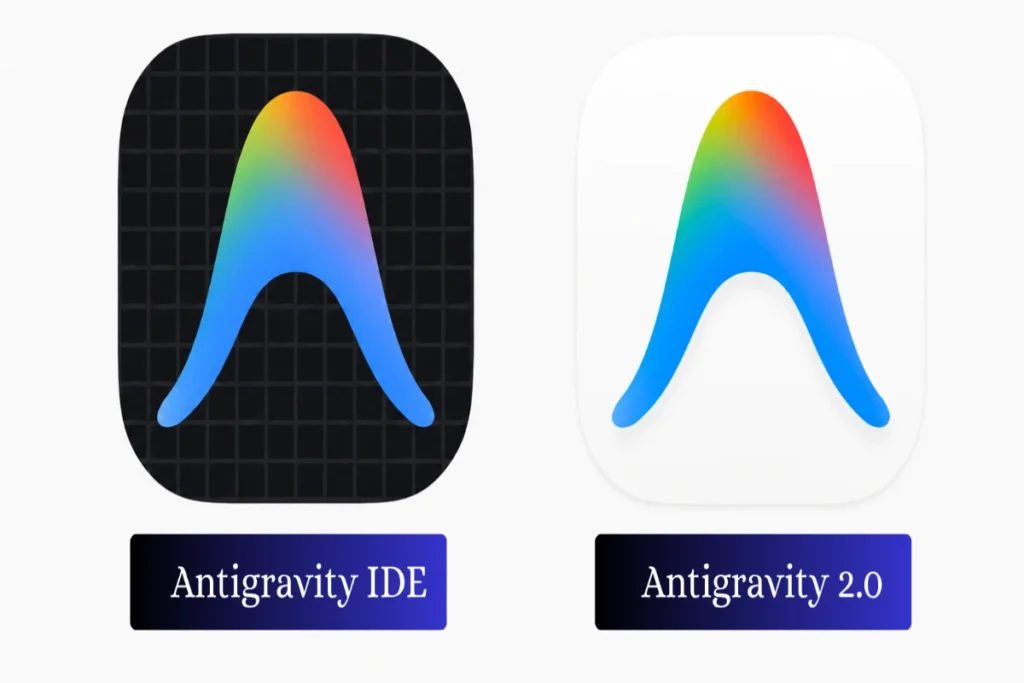
For now, both applications will continue to coexist, ensuring existing workflows remain unaffected. However, Google plans to gradually position the IDE as a dedicated coding tool by eventually removing the Agent Manager from it. In fact, Google’s own teams are already using both applications side by side.
Google Flow
Last year at I/O, Google introduced Google Flow, a tool built with filmmakers in mind to make AI-powered video creation easier. Now, Google is taking Flow to the next level by integrating Gemini Omni into the experience.
This means creating videos in Flow has become a much more seamless experience. You can blend real-world inspiration with generated content, and explore new ideas through natural conversations. Google AI subscribers worldwide can now use Gemini Omni Flash in Flow.
The upgrades don’t end with better video generation. Google is also making Flow smarter with the introduction of Google Flow Agent. Until now, Flow could only work on one prompt at a time. But now Flow Agent can work through multi-step tasks, helping you plan, reason, and build your project more efficiently. In its Official documentation, Google describes the Google Flow Agent as:
Google Flow Agent is your creative partner that can plan and reason through complex tasks with your inputs, under your control. Built with Gemini models, it brings expertise and a deep understanding of your project to help with early brainstorming, creating and editing.
Google Flow Agent is now accessible to all Google Flow users globally.
Google Search Updated with Powerful AI Features
Google just gave its Search box the biggest upgradation in 25+ years – and it’s powered by AI.
Here’s what’s new for you:
The search box now expands as you type, giving you room to ask longer, more detailed questions. It’s smart enough to suggest how to phrase your question – way beyond the basic autocomplete you’re used to. As Google says:
It’s more intuitive than ever, dynamically expanding to give you space to describe exactly what you need.
You can also search using more than just words. Simply upload an image, file, or video – or even use an open Chrome tab as your input and Google Search will understand exactly what you’re looking for.
And once you get your results, the conversation doesn’t have to stop there. You can ask follow-up questions right from the results page, and Google keeps your context intact – the deeper you explore, the more relevant your results become.
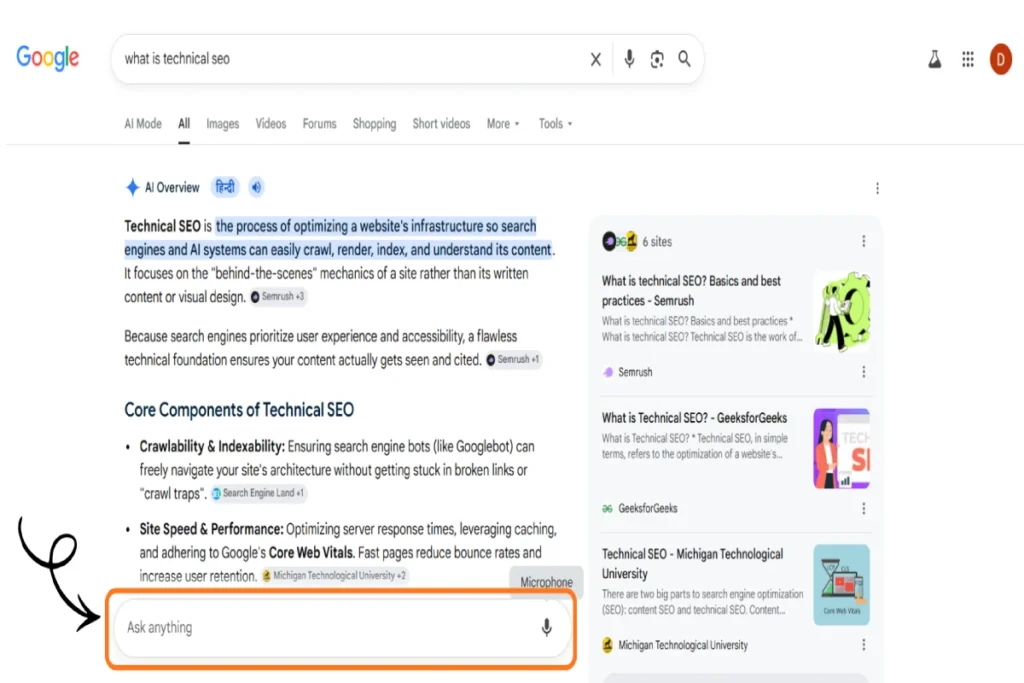
AI Mode’s smarter browsing experience is part of a bigger trend – back in February 2026, Google was already improving how links appear inside AI Overviews, something we broke down in our Google SEO Updates February 2026.
This is now available across all countries and languages where AI Mode is supported – so go ahead and give it a try!
Feature Enhancements
Google also added a range of new AI-powered features to products you already use. These improvements make everyday tools smarter, more helpful, and easier to use, helping you get answers faster, work more efficiently, and accomplish more with less effort.
Ask YouTube
Every day, you head to YouTube with questions, ideas, and things you want to learn. While there’s no shortage of great videos, figuring out where to begin isn’t always easy.
Searching on YouTube just got a lot smarter. Ask YouTube, a new feature in Youtube, makes finding information way easier. You get videos that actually match what you’re looking for, and it skips straight to the part of the video that’s relevant to you. No more sitting through the entire video just to find what you need.
Ask YouTube is currently available for Youtube Premium users in the U.S. at https://www.youtube.com/new, with plans to roll it out to all YouTube users soon.
Ask Maps
Ever wished Maps could just answer the questions you actually have – not just show you a list of places? That’s exactly what Ask Maps does.
Ask Maps is a new conversational feature that lets you search the way you naturally think. Instead of scrolling through reviews and collecting information yourself, with Ask Maps you just ask – and get a proper answer.
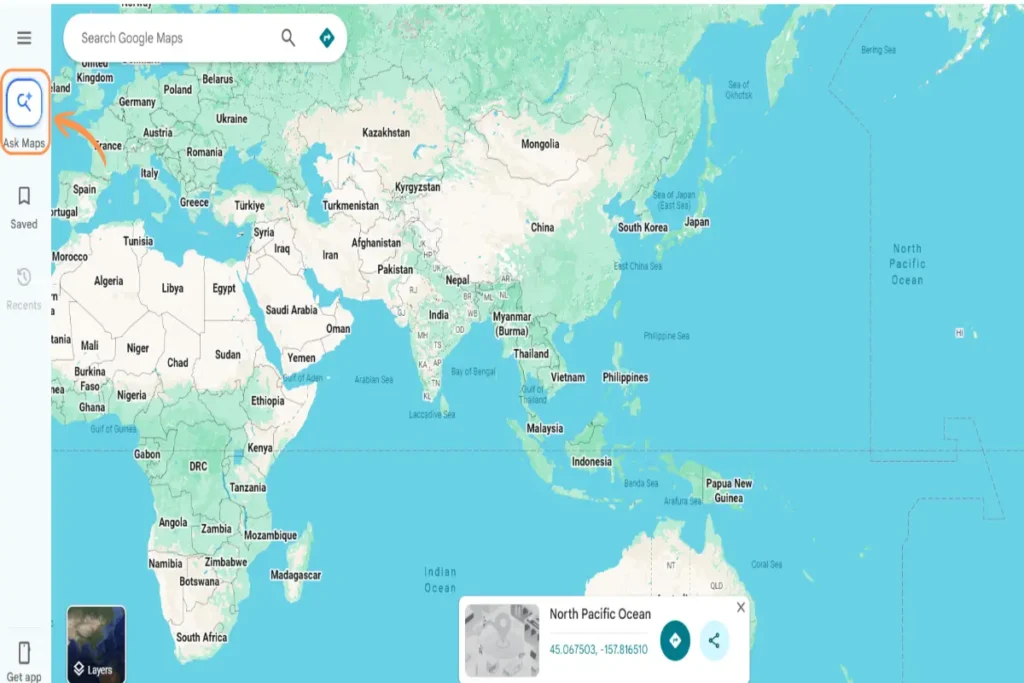
💡 Pro Tip
Don’t settle for generic searches. For example, instead of searching for a coffee shop, ask for a place where you can charge your phone without waiting in a long queue. The more details you provide, the more useful the answer will be.
It pulls from over 300 million places and reviews from more than 500 million contributors, so the answers are always fresh and relevant to you.
Just tap Ask Maps, ask your question, and you’re good to go.
Docs live
Imagine just talking to your doc – and watching it write itself.
That’s exactly what Docs Live does. You speak, it listens, and your thoughts are instantly organized, your document is structured, and everything comes together – effortlessly. No typing, no formatting and no back-and-forth.
What makes it even more powerful? Give it permission, and it goes to work for you – diving into your Gmail, Drive, Chat, and the web to automatically fetch the details that matter most to you. So the document you end up with isn’t just well-written – it’s a document that’s fully optimized for you.
Docs live is already on its way. If you’re a Google AI Pro or Ultra subscriber, or a Google Workspace business customer, you can get access this summer.
Google AI Studio
Google AI Studio has quickly become a go-to platform for turning AI ideas into real apps. Now, at Google I/O 2026, Google made the platform even more powerful by bringing Google Workspace directly into AI Studio.
That means you can build dashboards from Sheets data, create tools that organize Drive files, or develop apps around your team’s existing documents – all from a single place.
what’s new in AI Studio:
— Google AI Studio (@GoogleAIStudio) May 19, 2026
– workspace integration: build with the Google ecosystem of apps (Docs, Sheets, Gmail, and more)
– Android apps: vibe code and test apps on your phone
– publish your first two apps live on Cloud Run, no credit card required pic.twitter.com/PA5sOY6dM3
But that’s not all. Google is also making it much easier for you to build and launch Android apps. Instead of setting up a separate development environment, you can now create native Android apps right inside AI Studio-just describe what you want to build and get started.
Google is also simplifying the testing process. You can preview your app in the browser, test it on Android devices, and share early versions with testers through Google Play without ever leaving AI Studio.
And if you’re new to app development, there’s another reason to give it a try. As Google says:
Builders who are just getting started can now deploy their first two apps to Google Cloud at no cost, no credit card required.
Stitch
Ever had a great app or website idea but didn’t know how to turn it into a real design? That’s exactly the problem Google is trying to solve with Stitch.
Google Labs introduced Stitch in 2025 to turn simple prompts and images into UI designs and frontend code in minutes.
Now it’s even easier just type your idea or say it out loud, and Stitch will transform it into a user interface, helping you go from idea to design in no time. And you can even start with an existing design.
The best part? if something doesn’t look the way you imagined, you don’t have to start over. Just tell Stitch what you’d like to change in natural language, and it will update the design and generate new versions for you in seconds.
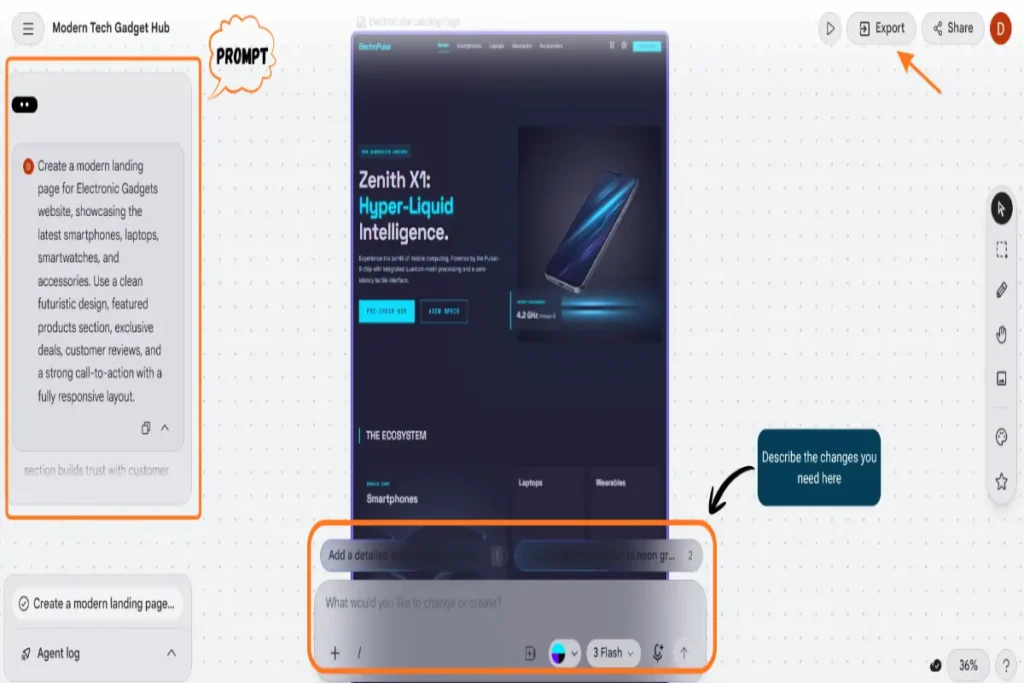
The process doesn’t stop at design. Since Stitch connects with tools like Figma, Netlify, Lovable, and Bolt, you can easily turn your design into code and get your website live much faster.
You can start using these new Stitch features right away, as they’re now available to everyone.
Plans & Pricing Updates
Google Launches New AI Ultra Plan
Google has announced a new $100/month AI Ultra plan, and if you’re a developer, tech lead, or power user – this one’s for you. It includes 5x more usage limit in Gemini and Antigravity than pro plan, 20TB of cloud storage, and YouTube Premium individual plan to watch tutorials and listen to music ad-free in the background while working.
Alongside this, the existing $250/month AI Ultra plan is getting a price cut to $200/month – same 20x usage limits and features, just lighter on the pocket.
New updates for our Google AI subscription plans 🎉
— Google (@Google) May 19, 2026
🔹 We’re introducing a new $100/month AI Ultra plan
🔹 And we’re reducing the price of our top tier Google AI Ultra plan to $200/month#GoogleIO pic.twitter.com/qb6rmfqJoI
Google Adds YouTube Premium Lite to Its AI Pro Plan
If you’re on Google AI Pro, you’re getting a new perk – YouTube Premium Lite is now included for free. This lets you watch most YouTube and YouTube Kids videos ad-free, offline, and in the background, without needing a separate subscription.
Final Insights
Google I/O 2026 showed just how quickly Google’s AI ecosystem is evolving. From powerful new AI agents and creative tools to major upgrades across Search, Workspace, and development platforms, these updates are designed to help you work smarter, create faster, and get more done with less effort.
As these features continue rolling out, it’ll be interesting to see how they change the way you search, create, shop, and stay productive every day.
Which Google I/O 2026 update are you most excited about? And if there’s a major announcement we didn’t cover, share it in the comments below-we’d love to hear your take.