
If you’ve been creating content for your website, you’ve probably wondered – is Google’s AI actually using my content? And if it is, why can’t I see it anywhere in Search Console? That’s a question the entire SEO community has been asking for the past two years. And on June 3, 2026, Google finally gave us an answer.
Google has started rolling out a new section in Search Console called Generative AI Performance Reports. In simple words – it now shows you how often your website appears inside Google’s AI features like AI Overviews and AI Mode.
But here’s the thing – it’s not as complete as we hoped. And there are some important limitations you need to know about before you get too excited.
I’ve broken it all down right here – simple, no jargon, straight to the point. Let’s get into it.
What Changed on June 3, 2026 – And Why It Matters
Think about it this way. You’ve written a great article. Google’s AI reads it, uses it to answer someone’s question, and shows a summary at the top of search results. Your content may have helped power that answer, but there was no easy way to track its performance in those AI-powered results.
That’s exactly the gap Google’s new Generative AI Performance Reports are trying to fill. It’s a new section inside Search Console that shows you how often your website appears inside Google’s AI features.
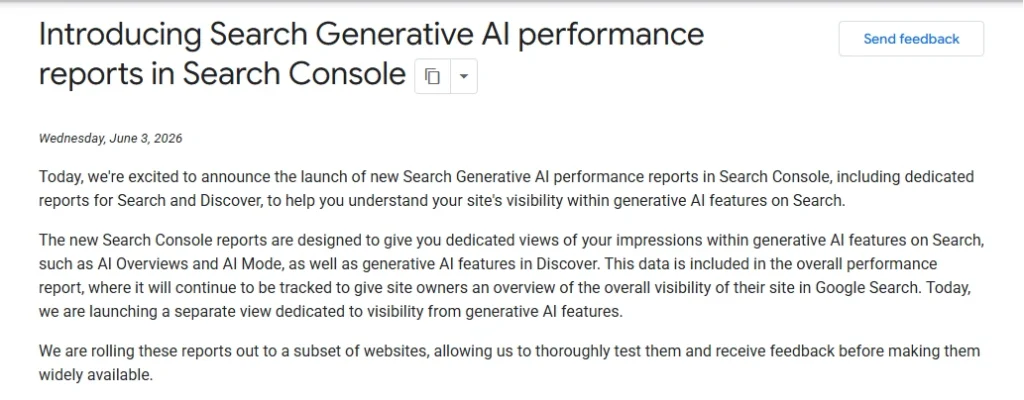
But before you get too excited – these reports show you impressions only. Meaning how many times your content showed up. Not how many people actually clicked through to your website. That difference matters a lot – and we’ll get into it in a moment.
Two Reports, Not One
Google didn’t just add one report. They added two. And they’re quite different from each other.
One report covers what happens when you actively search on Google. The other covers what happens when you’re just scrolling through your feed without searching for anything.
Think of it like this – Search is when you go looking for something. Discover is when Google comes to you with something it thinks you’ll like. Both now have their own AI reporting.
Here’s what each one covers:
Covers AI features that appear when you actively search for something on Google.
Covers AI features inside the Discover feed – content Google shows you without you searching.
Why does this matter? Because the two reports work differently, count data differently, and tell you different things about your website. Mixing them up will only confuse you – so it’s important to understand which one you’re looking at before drawing any conclusions.
What the Reports Actually Show You – And What They Don’t
Here’s exactly what you can see in these reports – and what’s still missing.
| What You Can See | Search Report | Discover Report |
|---|---|---|
| Impressions | ✅ Yes | ✅ Yes |
| Pages | ✅ Yes | ✅ Yes |
| Countries | ✅ Yes | ✅ Yes |
| Devices | ✅ Yes | ❌ No |
| Dates | ✅ Yes | ✅ Yes |
| Clicks | ⚠️ Not yet | ⚠️ Not yet |
| Search Queries | ⚠️ Not yet | ⚠️ Not yet |
What Is an Impression – And Why It Matters
Before you start reading these numbers, there’s one thing you need to understand first – what an impression actually means.
An impression is simply counted when a link to your website appears inside a Google AI feature. That’s it. It just means your content was shown to someone. It doesn’t mean they clicked on it. It doesn’t mean they visited your website.
Think of it like a billboard on a busy road. Every person who drives past counts as one impression. But how many of them actually stopped and walked in? That’s a completely different story – and unfortunately, that’s exactly what these reports don’t tell you yet.
What You Can See in the Reports

Impressions : How many times your website appeared inside a Google AI feature. This is the main – and currently only – metric available in both reports.
Pages : Shows you which specific pages on your website are appearing in AI features. One important thing to note – in the Discover report, Google shows the canonical URL of your page, not necessarily the URL the user lands on when they click. In simple words, Google shows the “main” version of your page rather than any duplicate versions.
Countries : In the Search report, “Country” means where the person was when they searched. In the Discover report, it means where the person was when they viewed your content. Same word, slightly different meaning in each report.
Devices : You can see device data in the Search report – desktop, tablet, or mobile. But in the Discover report, device data is not available at all.
Dates : Both reports let you filter data by date range and see how your impressions change over time – weekly or monthly. One thing to keep in mind – the newest data on the chart may still be getting collected and could change slightly over the next few hours. Google marks this with a dotted line on the graph.
Chart vs Table numbers : If the numbers in the chart and the table don’t match, don’t worry. This is completely normal. Both sections count data slightly differently – and Google has officially confirmed this is expected behavior.
The Bigger Gap – Clicks and Queries Are Still Missing
Now here’s the part that really matters.
These reports don’t show you clicks. And they don’t show you what people searched for when your content appeared.
You might see that your website showed up 10,000 times inside AI features last month. But you have absolutely no way of knowing how many of those people actually came to your website. Or what they were looking for.
Those two things – clicks and search queries – are the most important data points for any website owner. And right now, neither of them is available.
The Counting Confusion
Here’s something important to understand before you start comparing numbers – the two reports count impressions differently. So you cannot simply add them up and expect a meaningful total.
How the Search Report Counts
In the Search report, impressions are counted at the site level.
This means if Google’s AI Overview shows multiple pages from your website for a single search query, your website receives just one impression – not one for each page. Google groups all your pages together and counts it as a single appearance.
How the Discover Report Counts
In the Discover report, impressions are counted at the page level.
This means if two of your pages appear inside AI features in someone’s Discover feed, that counts as two separate impressions – one for each page.
There’s also one more important rule for Discover – an impression is only recorded when the link actually appears on the user’s screen. If someone opens their Discover feed but doesn’t scroll far enough to see your link, it doesn’t count. And if the same person scrolls past your link and then scrolls back to it in the same session, it still only counts as one impression.
What’s Not Included – The Missing Pieces
Clicks and queries are missing – we’ve already covered that. But there are a few more gaps worth knowing about before you start reading your data.
Gemini Is Not Included
If your website gets referenced inside Google’s Gemini chatbot, that data does not appear in these reports. These reports only cover Google Search products – AI Overviews, AI Mode, and Google Discover. The Gemini app is explicitly excluded.
So if someone asks Gemini a question and it uses your content to answer – you won’t see that reflected anywhere in Search Console. Gemini operates as a separate product from Search, with its own data that Google hasn’t made available here.
Search Labs Experiments Are Not Included
Google is constantly testing new AI features inside something called Search Labs – an experimental space where new ideas are tried before they go live for everyone.
If your content appears inside any of those experimental features, that data is not captured in these reports. Google has confirmed that Search Labs data is explicitly excluded, as those features are still in active development.

Historical Data Is Limited Right Now
One more thing worth knowing – these reports are still very new, so there isn’t a lot of historical data available yet. If you’re hoping to look back several months and see how your AI visibility has changed over time, you may not have enough data for that just yet.
This also means you should be careful when trying to compare long-term trends. As more data accumulates over the coming months, these reports will become much more useful for tracking changes and measuring growth.
Who Can See These Reports Right Now?
If you’ve opened your Search Console today and can’t find the Generative AI section – don’t worry. You haven’t missed anything.
Google hasn’t given everyone access yet. Right now, these reports are only available to a selected group of website owners. Google is testing them with a limited set of sites before rolling them out more widely. No date has been announced for when everyone will get access.
There are three reasons why you might not see the report yet:
- Google hasn’t added your website to the testing group yet.
- Your website hasn’t appeared in AI features enough times to generate data.
- You’ve previously set your website to not appear in AI features at all.
If none of these apply and you still can’t see it – it simply means your turn hasn’t come yet. Keep checking back.
There’s Also a New Setting You Should Know About
Along with these reports, Google has introduced something else – a new on/off switch inside Search Console that lets you control whether your content appears in Google’s AI features or not.
Let me explain what that means in simple words.
Right now, when someone searches on Google and an AI Overview appears, Google may use your website’s content to help answer that question. You never had a way to stop this – until now.
This new setting gives you a choice:
- Leave it on – Your content continues to appear in AI Overviews and AI Mode as usual.
- Turn it off – Your content will no longer appear inside AI features. Google will stop using it for AI answers.
How to Find It in Search Console
If you have access to these reports, finding them is straightforward. Just follow these steps:
Once you’re inside, you’ll see two separate tabs – one for Search results and one for Discover. Make sure you’re looking at the right one before drawing any conclusions.
What Does This Mean for You Practically?
Now that you know what these reports show – and what they don’t – here’s how to actually use them without getting confused or drawing the wrong conclusions.
The Honest Verdict
So – is this a good thing?
Yes, absolutely. For the first time, you can actually see how often your content is appearing inside Google’s AI features. That kind of transparency simply didn’t exist before – and that matters.
But is it enough? Not yet.
Without clicks and query data, you’re still only seeing part of the picture. You know your content is showing up. You just don’t know if it’s actually doing anything for your website. So think of this as a first step – useful, but incomplete. The full picture will come eventually.
For now – if you have access, explore it. Get familiar with your numbers. And keep an eye on this space, because AI search reporting is only going to get more important from here.
This was a major update from Google – if you want to catch up on everything else that changed recently, check out our April 2026 SEO updates. Have you seen these AI reports in your Search Console yet? Let me know in the comments.